Storm Guard - Weather Radar
- 4.1
- Rating
- 10.00K
- Installs
- Free
- Price
 Analysis by App-foxy
Storm Guard - Weather Radar is the kind of weather app I open when “Will it rain today?” is not quite a good enough question. Its focus is immediate rain and snow detection, with storm analysis intended to help me understand what is happening around me rather than simply read a general forecast. That makes it especially useful for short-term decisions: whether to leave now, delay a walk, protect equipment, or find shelter before conditions worsen.
I reviewed it as a free weather app from Kernalite, and my overall impression is fairly clear: it is more interesting for people who care about changing conditions than for anyone looking for a broad, all-purpose weather dashboard. The app has a 4.1 average from around 183 ratings, with over 10K installs, so it has found a modest audience without feeling like an overcrowded mainstream service. Its age rating is Everyone, and the current version is 1.60.
How Storm Guard works in everyday weather decisions
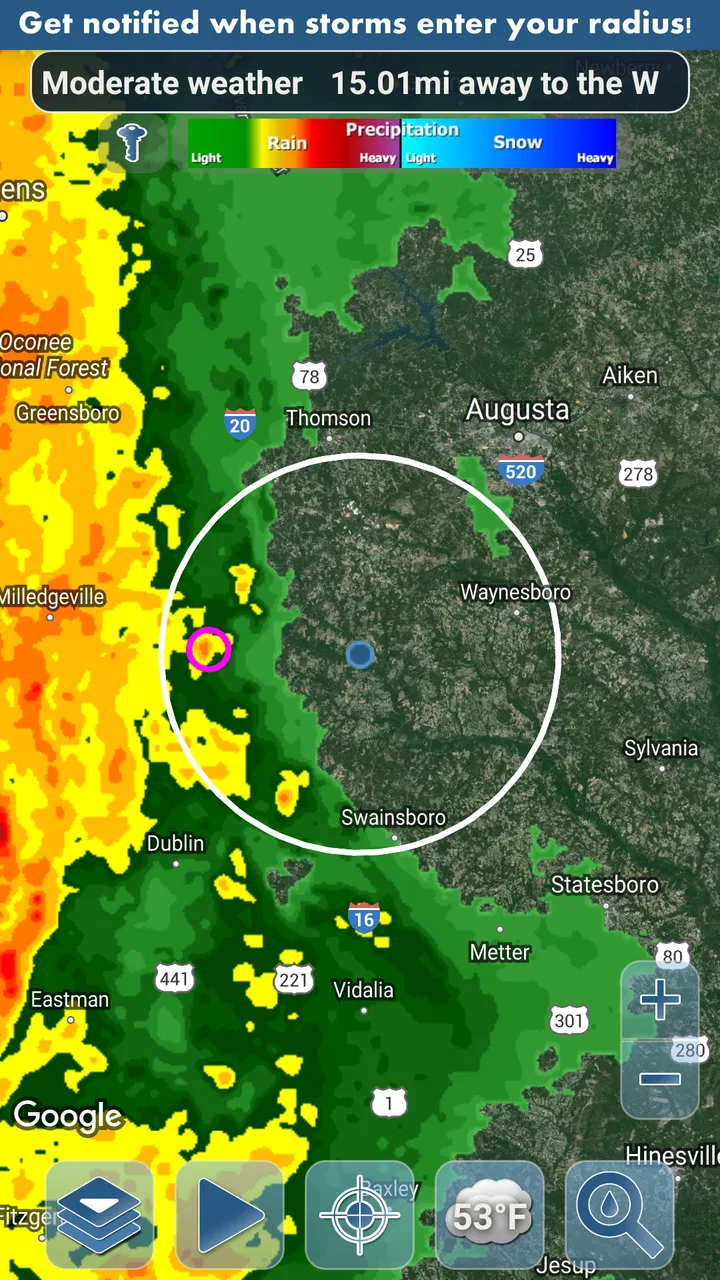
The central idea is simple but practical. Instead of treating weather as a fixed prediction, Storm Guard is built around notifications for rain and snow that are happening or approaching in real time. I find that distinction important because a normal daily forecast can say there is a chance of rain while failing to answer the question I actually have: is precipitation close enough to affect my next half hour?
You May Also Like

 Pandora - Music & Podcasts
Pandora’s Music Is Easy to Start, but Harder to Recover
Pandora’s strength is its low-effort path from a seed to a station. Its weak spot is how much confidence it asks you to place in connection, setup, and quiet recovery.

 AccuWeather: Weather Radar
AccuWeather Review: A Quick, Clear Forecast for Everyday Decisions
For everyday plans, the best forecast is the one you can understand quickly. AccuWeather makes rain timing, radar, and local conditions easy to act on, with a few trade-offs.

 Hill Climb Racing
Why Hill Climb Racing Still Turns Crashes Into One More Run
A tiny car, a bumpy hill and one more upgrade: Hill Climb Racing keeps resurfacing because its simple chaos makes every near-miss feel personal.

 AliExpress - Shopping App
AliExpress Makes Global Shopping Feel Personal, but Shoppers Bear the Risk
AliExpress turns a global marketplace into a pocket-sized discovery engine. Its reach is useful, its shopping loop compelling, and its trade-offs easy to miss.

 Lords Mobile: Kingdom Wars
Lords Mobile Is a Kingdom-Building Routine, Not a Quick Match
A case-by-case verdict on the building, battles, device demands, and social commitments that make Lords Mobile rewarding for some players and exhausting for others.

 PDF Scanner app - TapScanner
TapScanner Makes Paperwork Easier to Capture, Check, and Share
TapScanner makes scanning with a phone feel less like a rescue operation and more like a dependable step in getting work done. Its capture tools are useful, though not flawless.
More From Our News Desk
View All News


That makes the app a good companion for short trips, outdoor work, commuting, school runs, and walks with a dog. I would not use it as my only source for planning a full holiday or a long journey, but I would use it before stepping outside when the sky looks uncertain. The storm analysis angle also gives the app a more focused purpose than a standard temperature-and-sunshine display.
A realistic example is an afternoon bicycle ride. A general forecast might show scattered showers, which is too vague to guide a decision. Storm Guard is more useful in that moment because its purpose is to alert me to nearby rain or snow activity. I can decide whether to leave immediately, wait, or change the route before I am already on the road. That is a small change in workflow, but it is exactly the sort of decision a specialist weather tool should support.
Readability and navigation in changing conditions
Weather information is often checked quickly, sometimes outdoors, sometimes while carrying a bag or standing near traffic. For that reason, I judge this app less by how much information it can show and more by whether I can understand the important part without studying a complicated screen. Storm Guard’s narrow purpose helps here: precipitation alerts and storm context are easier to prioritize than a crowded page containing pollen, air quality, tides, ten-day forecasts, and lifestyle scores.
That focus can make the experience easier for people who prefer a single clear reason to open an app. Someone who finds large weather dashboards distracting may appreciate not having to sort through many unrelated panels before reaching the information that matters. I also think it suits users who prefer event-based guidance: an alert tells me that weather deserves attention, rather than asking me to repeatedly interpret a forecast.
There is a trade-off, though. A focused weather app can feel incomplete when I want broader context. If I need a detailed hourly forecast, a long-range outlook, sunrise information, or several environmental readings in one place, I would probably turn to a conventional weather service instead. Storm Guard’s value depends on whether immediate rain and snow detection is the information I want most.
For better readability, I would use it as a quick-check tool rather than leave it open continuously. I would first decide what action I need to take, then read the alert or storm information with that decision in mind. This avoids turning a short warning into a long session of interpreting weather details. It is also a useful habit for people who become overwhelmed by dense forecast screens: check the immediate precipitation risk first, then use another source only when more planning detail is necessary.
Motor and sensory considerations
Storm Guard has a potentially useful advantage for people who cannot comfortably keep checking a screen: notifications can bring the important change to the user instead of requiring repeated manual refreshes. That matters when I am cooking, working with tools, caring for a child, or moving between places. A timely alert can reduce the need to unlock the phone, navigate through several screens, and interpret a forecast while busy.
At the same time, notifications are not automatically accessible for everyone. A person who does not hear alert sounds may need to rely on visual or vibration cues available through the phone, while someone sensitive to interruptions may prefer fewer alerts. The practical experience will depend on the device’s notification controls and the user’s own settings. I would test the alert behavior during a calm period rather than assume that every warning will suit every sensory preference.
Motor accessibility also depends on how much interaction is required after an alert appears. The best workflow is one where the notification itself provides enough reason to pause or investigate, because repeated tapping and map manipulation can be inconvenient for users with limited dexterity or shaky hand control. If the app requires frequent precise gestures to understand storm movement, that could become tiring even though the underlying concept is useful.
One tip I would give is to establish a simple personal rule for alerts. For example, I might treat a rain notification as a signal to check conditions before leaving, not as an instruction to immediately change plans. That reduces rushed phone handling and gives me time to place the device securely, enlarge the relevant view if needed, and make a decision safely. The app is most helpful when it supports a calm routine rather than creating another source of urgency.
Visual users should also think about contrast and viewing conditions. Weather apps are often consulted in bright daylight, through a wet screen, or while wearing sunglasses. I would not judge an alert only from an indoor test. A display that feels clear at home may be harder to interpret outside, and a user with low vision may prefer the phone’s own text enlargement or screen-reading tools where they work with the interface.
Situational access for work, travel, and outdoor plans
The strongest accessibility benefit here is situational rather than a formal accessibility feature. Storm Guard can reduce the amount of attention needed to monitor precipitation during a busy day. A gardener, delivery worker, groundskeeper, runner, or parent waiting for a school pickup may not have the time or physical freedom to inspect a forecast every few minutes. A notification-based approach fits those situations better than a manually checked forecast.
It can also help people whose plans are especially affected by rain or snow. Wheelchair users, people using walking aids, and anyone who needs extra time to move between shelter points may value earlier awareness because a sudden shower is not merely inconvenient. The app cannot remove slippery surfaces, blocked paths, or transport disruption, but an early warning may make it easier to choose a safer route or postpone leaving.
For outdoor workers, storm analysis may be more useful than a simple rain icon because the question is often whether conditions are developing nearby. I would still avoid treating the app as a replacement for official emergency warnings. A specialist alert can support everyday planning, while serious weather decisions should also use local authorities and other trusted sources. That distinction is important for anyone who may be at greater risk during storms.
Travelers should approach it in the same practical way. It may help with deciding when to walk from a station, whether to pack waterproof clothing for a short outing, or when to move an event indoors. It is less suitable as the only planning tool for unfamiliar regions, long drives, mountain routes, or severe-weather preparation. In those cases, I would want broader forecast coverage and local safety information alongside it.
Another useful workflow is to combine the app with a low-tech backup. If I am heading somewhere where a missed alert would have serious consequences, I would check the forecast before leaving and carry the clothing or equipment needed for changing conditions. Storm Guard works best as an extra layer of awareness, not as permission to ignore the sky, local warnings, or common sense.
Where the focused design creates barriers
The first limitation is scope. Storm Guard is not the obvious choice for someone who wants one app to manage every weather question. Its emphasis on real-time rain and snow detection means I may still need another service for detailed planning. Using two apps can be more work, especially for people who prefer one consistent interface or who find switching between tools difficult.
The second limitation is alert management. Notifications are valuable only when they arrive at a useful moment and remain understandable. Too many alerts can lead to fatigue, while a user who silences all notifications may lose the app’s main advantage. I would recommend reviewing the phone’s notification behavior after using the app for a few ordinary weather changes. The goal is not maximum activity; it is a level of interruption that genuinely improves decisions.
There is also a difference between detecting precipitation and explaining its consequences. Knowing that rain or snow is approaching does not automatically tell me whether a particular pavement will become hazardous, whether public transport will be delayed, or whether a storm is severe enough to cancel an event. The app’s storm focus can add useful context, but I still need judgment and, for serious conditions, authoritative local information.
People with visual, hearing, cognitive, or motor needs should evaluate the complete notification-to-action path, not just the opening screen. Can I notice the alert? Can I understand it quickly? Can I act without rushed gestures? Can I adjust the phone so the warning is not lost among other notifications? These are practical questions that vary by device and personal setup. I appreciate the potential of the app’s alert model, but I would not describe it as universally accessible without testing it in the user’s own routine.
The purchase model is another detail to consider. Storm Guard is free to install, with in-app purchases priced at $0.99 per item. That is a low entry barrier for trying the basic experience, but I would still check which functions are included before building a daily routine around it. A user who needs a particular alert or analysis capability should confirm that the desired workflow is available without assuming that every part of the app is included at no cost.
Who should choose it over a normal weather app?
I would recommend Storm Guard to someone who repeatedly asks whether rain or snow is about to affect a plan. It is a sensible fit for short-term awareness, especially when checking a phone manually is inconvenient. The app’s focused purpose may also appeal to people who dislike broad weather apps filled with information they never use.
I would be more cautious about recommending it to someone who wants detailed long-range planning, a complete travel forecast, or a single dashboard covering many weather categories. In those cases, a full-featured mainstream weather app is likely to be more efficient. The choice is not really between a good app and a bad one; it is between immediate precipitation awareness and broader forecast coverage.
Users who depend heavily on accessibility settings should test the app during the situations where it will matter most. Try reading it outdoors, notice how alerts appear when the phone is locked, and see whether the notification style works with the device’s sound, vibration, text-size, and screen-reader preferences. That short trial can reveal more than a store description, particularly for someone who needs reliable warning without complex interaction.
The app’s history also suggests that it is an established product rather than a brand-new experiment: it was released on February 28, 2016. Its current version, 1.60, is the version I would evaluate when deciding whether the interface and behavior fit my phone. For a weather tool, continued usefulness matters more to me than novelty, but I would still keep expectations realistic about how specialized its feature set is.
My inclusive verdict after using its weather workflow
Storm Guard - Weather Radar earns its place by concentrating on a real everyday problem: noticing nearby rain and snow before they disrupt a plan. I like the idea of receiving a timely prompt instead of repeatedly checking a forecast, and I can see clear value for commuters, outdoor workers, families, and people who need extra time to respond to changing conditions.
Its accessibility story is strongest when notifications reduce screen dependence and support people who are busy, tired, or managing movement outdoors. It is weaker when the user needs extensive forecast detail, highly customized interaction, or guaranteed compatibility with a particular sensory or motor setup. Those concerns do not make it a poor choice, but they do make a personal trial important.
My final advice is to treat it as a focused companion rather than a complete weather replacement. Use it to notice precipitation, use the storm information to decide whether to pause or adapt a plan, and keep a broader forecast or official warning source available for serious or complex situations. For a free weather app from Kernalite, with optional in-app purchases of $0.99 per item, it offers a practical starting point for people who care most about immediate conditions.
In short, I would choose it when the key question is “Do I need to change what I am doing soon?” I would skip it when the key question is “What will the entire week, journey, or region look like?” That clear boundary is also its main strength: Storm Guard does not need to do everything to be useful, but it does need to make its immediate warnings easy for each person to notice, understand, and act on.
FAQs for Storm Guard - Weather Radar
01What is Storm Guard - Weather Radar used for?
Storm Guard - Weather Radar is designed to help users monitor current weather conditions and follow approaching storms through radar-based maps and alerts. It can be useful for checking rain, thunderstorms, wind, and other severe-weather activity near your location. The app is best treated as a convenient forecasting and awareness tool rather than a replacement for official emergency warnings.
02Does Storm Guard - Weather Radar provide accurate real-time weather information?
The app presents weather data from radar and forecasting services, so its usefulness depends on the quality, coverage, and update frequency of the data available in your region. Radar imagery can be especially helpful for seeing precipitation movement, but forecasts may become less reliable several hours ahead or in areas with limited coverage. Always compare serious weather information with local meteorological authorities.
03Does the app require location access to work properly?
Storm Guard - Weather Radar can generally be used to search for places manually, but location access makes the experience more convenient by centering the map on your current position and helping deliver relevant weather alerts. You can usually choose whether to allow location access while using the app or deny it. Review the requested permissions and enable only those you are comfortable sharing.
04Can Storm Guard - Weather Radar send severe-weather alerts?
Depending on your device, region, subscription level, and notification settings, the app may provide alerts for storms, heavy rain, or other potentially dangerous conditions. Alerts are not guaranteed to cover every event, and notification delivery can be affected by battery-saving settings, weak connectivity, or disabled permissions. For life-threatening situations, rely on official emergency alerts and instructions from local authorities.
05Is Storm Guard - Weather Radar free to download and use?
The app may be available to download at no initial cost, but some features can depend on advertising, in-app purchases, or a premium plan. Advanced radar layers, extended forecasts, ad-free viewing, or additional alert options may not be included in the basic version. Before subscribing, check the current store listing, trial terms, renewal conditions, and privacy information to understand the total cost.
Pros
- Clear radar maps make approaching storms easy to track.
- Useful weather alerts help users prepare for severe conditions.
- Location support provides forecasts for current and saved places.
- Radar layers offer helpful visual detail beyond a basic forecast.
- Simple interface makes essential weather information quick to find.
Cons
- Some advanced radar features may require a paid subscription.
- Radar accuracy and coverage can vary by region.
- Frequent alerts may feel excessive during unsettled weather.
- The app may use noticeable battery and mobile data for live radar.
- Forecast details may be limited compared with larger weather services.

Storm Guard - Weather Radar
Gallery